Start from a template, customize it as far as you want, and launch a branded SaaS product your customers pay you for. Every app gets its own dedicated database and an isolated container for custom code.
Pick a complete application, a single feature, an installable custom service, or an AI configuration tuned to your industry. Every template is versioned, authored, and installs into a working application.
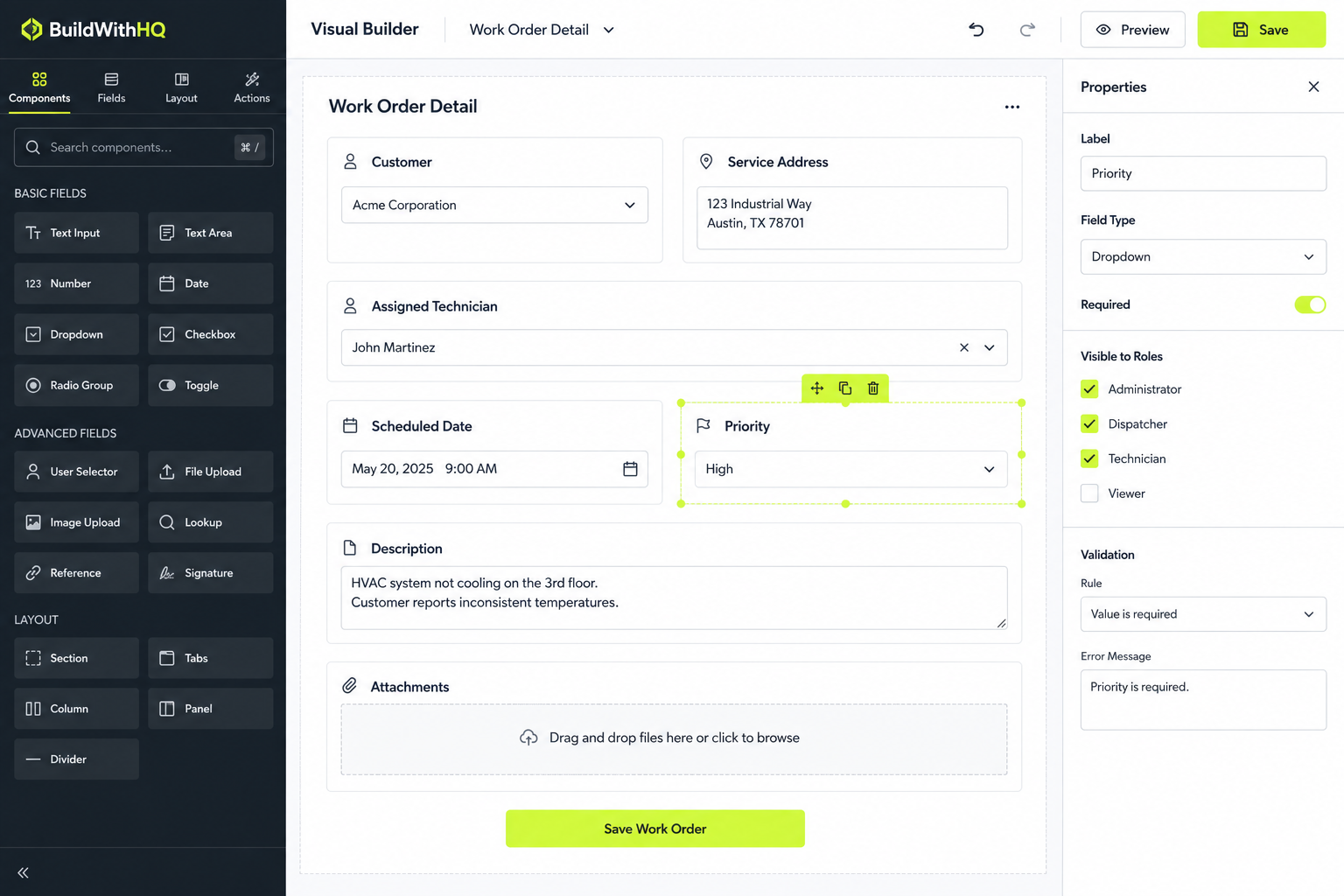
Browse templatesEdit pages visually, add custom modules and fields, fork any page per customer — then bring in a developer and write real code in your own container when the visual layer isn't enough.
See what's editablePoint a custom domain at it, invite your customers, and charge them monthly. Tenant isolation, billing, payouts, and the audit trail are already running underneath.
Read the launch guideSee what BuildWithHQ looks like when its application primitives are assembled into focused, sellable SaaS products.
Coordinate specialized AI operators with scoped context, approvals, workflows, and a visible execution trail.
Turn CRM history, account activity, intent, and engagement into ranked opportunities and explainable next actions.
Identify the customer, apply policy and permissions, execute safe resolutions, and escalate only when authority runs out.
Move from brief to audience, assets, approvals, launch, experiments, and governed optimization across channels.
Compress cross-functional operating changes into material executive signals, evidence, forecasts, and decision packages.
Turn email, SMS, forms, and inbound messages into a shared team queue where AI sorts, assigns, prepares actions, and keeps humans in control.
Relate contacts, companies, files, documents, meetings, tasks, projects, and custom records so users can navigate the business from any direction.
Give customers a secure shared workspace for communications, files, requests, approvals, and milestones while your team keeps internal context private.
Make company documents searchable, connect them to customer and sales records, and surface daily AI insights and expansion opportunities from the relationships you already have.
Host any frontend anywhere while BuildWithHQ provides the managed data, permissions, workflows, AI, files, relationships, audit, and custom services behind APIs.
Turn claims, applications, reviews, investigations, requests, and other complex cases into controlled workflows with documents, SLAs, approvals, AI, and audit history.
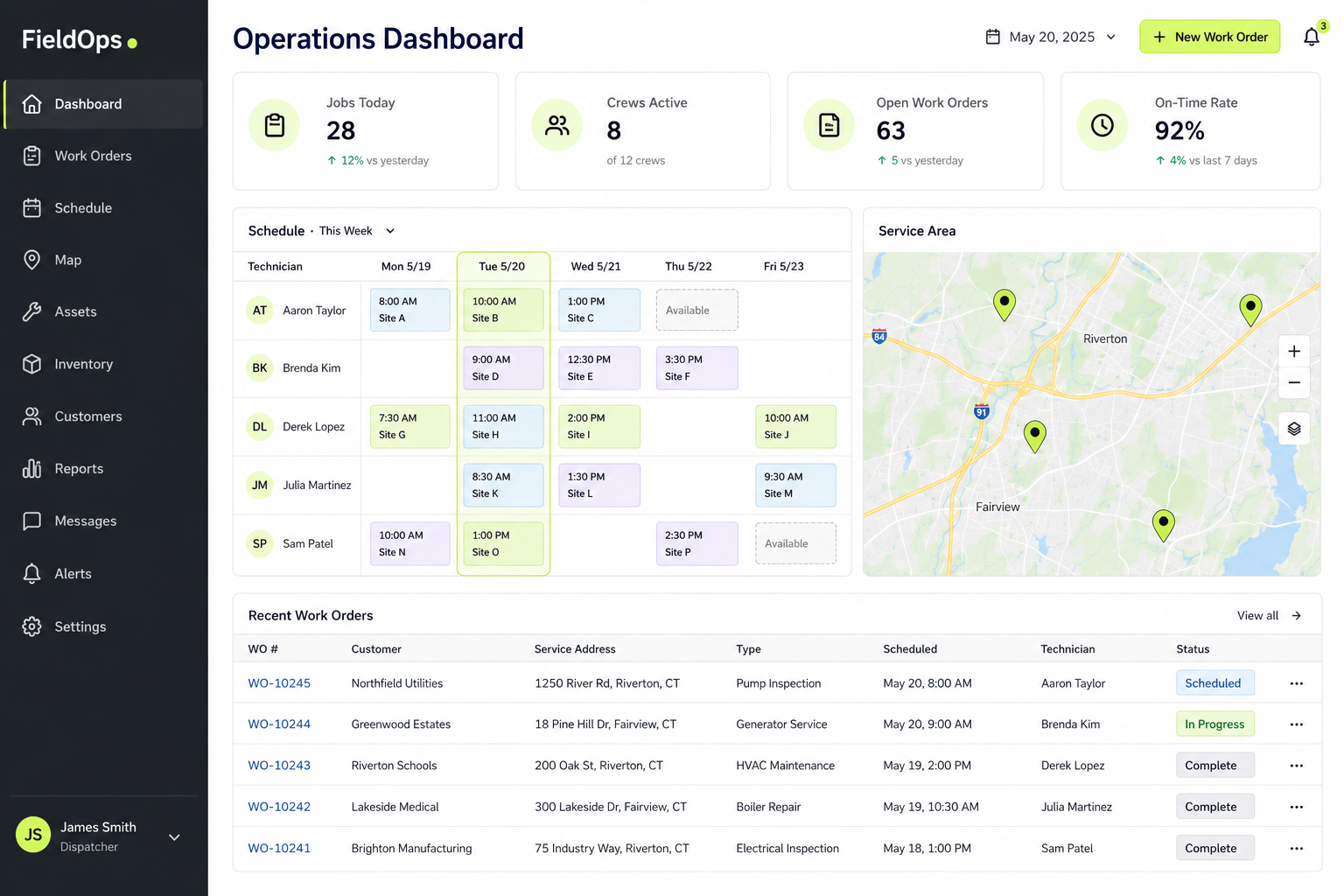
Connect customers, locations, equipment, inspections, work orders, technicians, service history, photos, parts, and AI maintenance signals in one operating system.
Turn SOPs, policies, manuals, training, system documentation, and tribal knowledge into permission-aware answers, role-specific guidance, and trusted operating context for employees and AI agents.
Pin any business record and turn its permitted recursive graph into a living workplace where people, GoClaws, workflows, and automation collaborate, detect stale work, escalate through Universal Inbox, and replay the full history.
Run customers, jobs, schedules, teams, approvals, secured AI assistance, custom estimating, files, conversations, and follow-up in one vertical service platform.
Manage bookable services, contacts, calendar placement, staff or resource assignment, capacity, payment state, and pre/post-service follow-up in one secured workflow.
Choosing a newer vendor over an incumbent is a real decision with real risk. Here's how we've engineered that risk down instead of asking you to ignore it.
An authenticated export produces your records, files, AI data, vectors, and logs with a manifest and SHA-256 checksums. Platform tables and other tenants stay out; everything that is yours comes with you.
How export worksWhen the visual layer runs out, custom services run in an isolated container behind a declared API contract. Your engineer writes normal code with normal libraries, and the platform validates, authorizes, calls, and logs it.
Read the architectureAuthorization isn't just enforced, it's recorded. Any past access decision can be re-derived as it stood at the time and compared against the log, producing an explicit verdict rather than an assurance.
See the audit trailChange history tells you who edited a record. It doesn't tell you who read it, what the AI retrieved, or whether that person was actually allowed to. BuildWithHQ writes all of it to a separate, append-only compliance database that the application cannot rewrite.
Revealing an encrypted field is an explicit, refusable operation, and both outcomes are recorded.
Re-derive a decision as of then, or under today's rules, and see whether they still agree.
Each entry folds in the previous entry's hash, so a deleted or altered row breaks the chain visibly.
Roles, locations, and records keep full version history, so "who could see this in March" is answerable.
Illustrative sample. Records a user has no role on never appear in a result set at all, so there is no rejection to log. Refusal is reserved for explicit privileged operations like revealing an encrypted field — and those refusals are recorded with the same weight as successes.
Most low-code tools give you speed right up until the first thing they didn't anticipate. BuildWithHQ keeps the visual layer and puts a real escape hatch underneath it, so the ceiling is your budget for a developer rather than the vendor's roadmap.
Drag and drop pages, or edit the underlying JSON directly.
Add business objects the platform never shipped, with the same security and logging.
One authorization model across modules, APIs, exports, and AI.
Install specialist libraries that shouldn't run inside a shared platform.
Not a shared database with a tenant column. Three separate databases and a container, provisioned when the app is created — so isolation is something you can point at in a review, not a promise about query filters.
Most platforms bolt a permission check onto each feature as it ships, which is why the tenth feature always leaks. BuildWithHQ resolves the set of records a user may see once, in a single place, and every read path in the product goes through it — including the ones written after you launch.
Permissions attach to individual records rather than just to screens. Users can hold several roles at once, and one record can be shared with several roles without duplicating it. Called DataRoles in the product.
A second boundary alongside roles, for branches, regions, facilities, and territories. The role has to allow it and the location has to match.
Being able to open a record doesn't imply being able to export it, or to let the AI read it. Those are three different flags.
Sensitive fields are stored encrypted, fall out of search and AI retrieval automatically, and every reveal is logged.
A fork records what it changed, so when you publish an update the customer can see the difference and adopt it — or stay put, and roll back if they change their mind.
Most of your support queue is people asking for a field to move, a column to be added, or a panel to be reordered. On BuildWithHQ, the customer can fork their own page and do it themselves — without branching your codebase, without a ticket, and without breaking anyone else's version of that page.
Small layout requests stop reaching you at all.
Version history per fork, with rollback to the base page.
One customer's edits never touch another customer's page.
Builder-authored custom work is tracked as a sellable, entitled item.
Lock-in is a business model, not a technical necessity. Both you and the companies using your app can export everything, whenever they want, without asking anyone's permission.
Your business data and every uploaded file, packaged together rather than as a CSV that loses the attachments.
Embeddings and AI knowledge come with the export, so the work you put into training context isn't stranded.
The compliance trail exports too. Your audit history is yours, not a record we keep and you rent.
A manifest plus SHA-256 checksums, so you can verify the package is complete and unaltered on arrival.
Modules, pages, layouts, menus, and data bindings that materialize into a working product on install.
See it liveA single page, component, or data model you add to an app you already have, without touching the rest.
See it liveSigned, versioned services in their own container — installed once, then called like any other endpoint. Called appliance endpoints in the product.
See it liveInstructions, tone, vocabulary, and guardrails for one industry — blocked from going live until they pass their own tests. Called harness packs in the product.
See it liveNot sure what to build first? The documentation includes twenty-one worked build guides — an agency CRM, a support desk, a call intelligence tool, a relational data app — each with the data model, the pages, and the automation it needs.
Browse the build guidesAn installable custom service is a real service running in its own container — document processing, a specialist model, an industry calculation, anything that doesn't belong in a visual builder. It arrives as a signed, versioned package, declares the endpoints it exposes, and from then on your pages, workflows, and AI actions call it like any other endpoint. In the product these are called appliance endpoints.
Publisher signatures, image digests, SBOM references, and a release fingerprint on every version. You know exactly what is running.
A package states what it needs to reach. Sealed packages reach nothing at all, and the manifest is authoritative.
Versions can't be listed until they pass validation, and a bad release can be revoked without waiting for anyone to uninstall it.
Request and response hashes, outcome, duration, package version, and the code identity frozen at call time.
The same infrastructure runs the marketplace. If you build something worth reusing, you can publish it as a product with versions, offers, and pricing, and the platform handles checkout, entitlements, and payouts. If someone else already built it, you buy it and install it.
These aren't add-ons you build later. They ship with every application, permission-aware from the start.
Surfaced observations drawn from records the user is already allowed to read. An insight generated from a record you can't see never reaches you — the permission is inherited from the source, not applied afterward.
A per-user feed of what changed since they last looked, so the answer to "did anything happen while I was out" takes five seconds instead of a scroll through six modules.
Pin the records and pages someone works from every day. If their access to a record is later revoked, it disappears from their favorites automatically — the shortcut can't outlive the permission.
Email, SMS, web leads, and internal messages land in one place. Every conversation is a platform record, so it inherits the same permissions, custom fields, and logging as everything else.
Pin any record and turn its permitted recursive graph into a live workplace for people, GoClaws and workflows, with stale-work detection and Graph Playback.
Most of what a business application does isn't a form — it's the follow-up that should have gone out on Thursday, the approval nobody chased, the status that should have flipped when the invoice cleared. Workflows run that work in the background, on the same permission model as everything else.
Send an email or SMS, update a record, call an external API, run an AI action, wait for a date, branch on a condition, or stop and require a human approval before anything else happens.
Changing an automation doesn't rewrite the runs already in flight. A new version is created, new work moves to it, and everything currently running finishes on the definition it started with.
Background workers lease each job before touching it, so two servers can never pick up the same step. Failures retry on a schedule instead of disappearing silently.
Managers can see run history, failure rates, and cycle times without that reporting view becoming a side door around record permissions.
No business application lives alone. Your app can call out to other systems, accept calls and webhooks coming in, and expose selected capabilities to your own customers and partners — without a single credential or security decision ending up in the browser.
Trigger an external API from a page action, a workflow step, a scheduled job, an AI action, or a background process.
Accept authenticated requests and provider callbacks, map the payload onto your records, and start work from them.
Secrets are referenced through approved mappings. The front end never holds a key and never decides what it can reach.
Rate limits, retry policy, and duplicate protection are part of the integration layer, not something each connection reinvents.
A separate database per app, not a tenant column in a shared table everyone queries.
When the visual layer runs out, your developer writes real code in an isolated container.
Past authorization decisions are replayable and produce a verdict, not a reassurance.
Full export with manifest and checksums, for you and for the companies using your app.
The allowed record set is resolved first, then context is assembled — never filtered afterward.
Full docs, error codes, and the architecture reference are readable before you create an account.
| Capability | Typical platform | BuildWithHQ |
|---|---|---|
| Tenant isolation | Row filtering inside one shared database | A separate database per application |
| Audit logging | Change history: who edited what | Read-level logging, plus refused reveals and exports |
| Proving a past decision | Trust the log | Re-derive the decision and compare it to the log |
| Custom code | Fights the platform, or isn't possible | Isolated container with your own SDKs and binaries |
| Customer-level changes | A support ticket, or a code branch | The customer forks their own page |
| Getting your data out | CSV export, attachments left behind | Full package with files, vectors, logs, and checksums |
| Templates | Static page themes you can't version | Versioned artifacts with authorship and eval gates |
| Selling to your customers | Bolt-on, or missing entirely | Built in, with Stripe Connect revenue share |
| Resource economics | Usage meters across storage, bandwidth, functions, compute, AI, or seats | Broad platform allocation with explicit capacity add-ons when you actually need more |
The common thread isn't company size. It's needing an application specific enough that packaged software doesn't fit, and accountable enough that a weekend project won't do.
Every department eventually runs on a spreadsheet that has outgrown itself. Build the actual application, with the audit trail and permission model your security team will ask about, without waiting eighteen months for central IT.
See the audit trailLaunch a branded product for each client from a template you already own, let them make their own small changes, and bill monthly instead of hourly.
How forking helpsAuth, tenancy, billing, inbox, calendar, workflows, and AI already work. What's left to build is the part that makes your product yours.
Start from a templateUse the visual layer for the eighty percent that's genuinely repetitive, then write real code in your own container for the rest. No proprietary scripting language to learn and abandon.
Read the extension modelA partner program for MSPs who want to deploy on their own iron, resell to their client base, and earn on every builder they bring across.
Partner programIf you've solved something well for one vertical, publish it. Versions, offers, entitlements, checkout, and payouts are already built.
Start sellingTwenty-one worked guides take a product you already understand and rebuild it as yours — the data model it needs, the pages it needs, the automation behind it, and the angle that makes your version better than the original rather than a weaker copy of it.
Both, on purpose. Pages, data models, workflows, and permissions are built visually, so most of an application takes days rather than months. When you hit something the visual layer can't express, you write real code in an isolated container and the platform calls it through a declared API contract. You don't have to choose one and live with the ceiling.
Every application you create is provisioned with three dedicated databases — a runtime database, a compliance log database, and an AI and vector database — plus an isolated container for custom code. Isolation is a physical boundary you can point to in a security review, not a filter applied to a shared table.
You export it. An authenticated export produces your records, uploaded files, AI data, vectors, and log history, packaged with a manifest and SHA-256 checksums so you can verify nothing is missing or altered. Other tenants' data and platform secrets are excluded. Your customers can export their own data the same way.
Yes, and that's the intended path for anything specialized. Your developer writes normal code with normal libraries, packaged as an extension that runs in its own container. The platform validates the contract, enforces permissions, calls the endpoint, and logs the invocation — so bringing in an outside contractor doesn't mean widening your security boundary.
Reads, not just writes. Encrypted-field reveals, AI retrievals, exports, and the authorization decision behind each one are written to a separate append-only database that the application cannot rewrite. A reveal that is refused is recorded with the same weight as one that succeeds.
Records a user has no role on are a different case: they never enter a result set, so pages simply load with what that person can see. There is no access-denied event because there was no attempt to deny — and that leaks less than an error would, since a refusal confirms a record exists.
Past decisions can also be replayed: the platform re-derives the access envelope as it stood at the time and compares it against what was logged, returning an explicit verdict rather than an assurance.
Yes. A customer can fork a page and change it for themselves — reorder a panel, add fields, adjust the layout — without branching your codebase and without affecting any other customer's version of that page. Forks keep their own version history and can roll back to the base page. When you publish an update, the customer sees what changed and chooses whether to adopt it.
Those tools are strong in a focused layer — a front end, an internal tool, a backend, a database. BuildWithHQ combines the backend, the customer-facing application, CRM, inbox, calendar, workflows, permissions, billing, templates, and AI into one product, aimed specifically at people building multi-tenant SaaS they intend to resell. There are detailed, honest comparisons against more than forty platforms, including cases where the other tool is the better answer.
That's the core model. You pay a flat monthly subscription, and the platform takes a share of what you charge your customers, collected and paid out through Stripe Connect. Tenant provisioning, custom domains, per-customer billing, and entitlements are built in rather than assembled.
A flat monthly subscription plus a share of builder-to-customer revenue. Plan tiers are being finalized ahead of public launch, and nothing is charged while your application is still in development.
All of it. The full builder console preview runs to sixty-nine pages with realistic data, the documentation covers every module and every error code the platform can raise, and the technical architecture reference is downloadable as a PDF. None of it requires a sign-in.
Plan tiers are being finalized ahead of public launch. Start building now — nothing is charged while your application is still in development.
Create an account, explore the full builder console, and launch your first application on a custom domain.
Get started free Tour the console first No credit card required to start.